How to Humanize AI Content : Artificial intelligence has undeniably transformed content creation in our digital age. Platforms like ChatGPT and Jasper have made it simple to produce vast amounts of text with minimal effort. Yet there's an undeniable drawback, much of this content feels mechanical, lacking the nuance and warmth of human expression.
The challenge lies in bridging that gap. Whether you're drafting blog posts, marketing copy, or social media updates, ensuring the output resonates with readers is essential. This piece examines the importance of humanizing AI content to make it sound more natural and emotionally engaging. We'll discuss practical methods to achieve this and introduce GeneratePrompt.ai's AI Humanizer, a useful tool for the task.
The goal isn't just readability, it's authenticity. Stripping away the artificial stiffness while preserving clarity makes all the difference.
What Does It Mean to Humanize AI Content?
Humanizing AI content means refining AI-generated text so that it reads more like something written by a real person. It involves enhancing the tone, flow, and nuance to better reflect human expression and emotion.
Why Humanizing AI Content Matters :
• Improves engagement: People connect with content that feels authentic.
• Boosts trust and credibility: Humanized content sounds more natural and less like spam.
• Increases SEO value: Search engines prioritize content that offers value and readability.
• Prevents penalties: Google’s algorithms can now detect low-quality AI content and may penalize websites using it without proper editing.
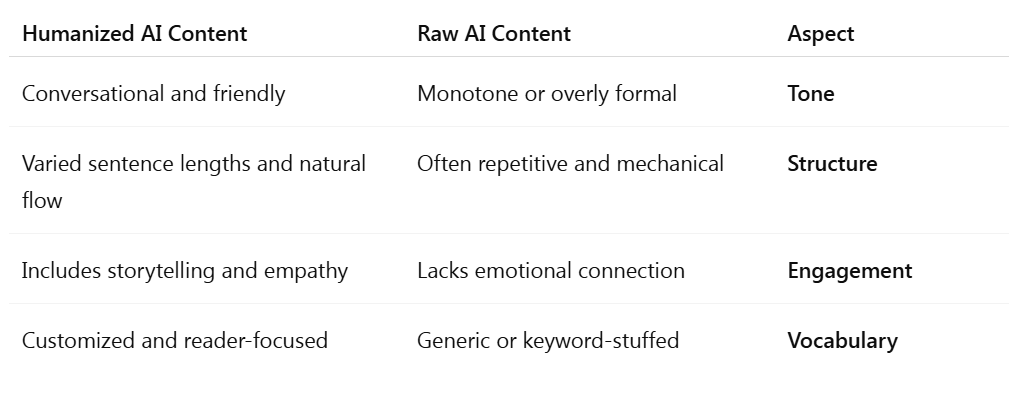
Key Differences Between Raw AI Content and Humanized Content
__________________________________________________________________________________________________________________
Best Practices to Humanize AI Content
Humanizing your content doesn’t mean rewriting everything manually. It’s about fine-tuning the content to feel more relatable and human. Here’s how to do it:
1. Adjust the Tone
• Match the tone to your audience (formal, casual, humorous, etc.).
• Avoid overly robotic phrasing or technical jargon unless needed.
2. Use Natural Language
• Write the way people talk.
• Use contractions (you’re, it’s, can’t).
• Add filler words sparingly to mimic natural speech (like, just, kind of).
3. Add Personal Stories or Anecdotes
• Incorporate brief stories or personal examples to bring the content to life.
• This helps the reader relate and stay engaged.
4. Break the Pattern
• Use a mix of sentence lengths and structures.
• Include rhetorical questions or surprising facts.
5. Eliminate Redundancy
• AI tools tend to repeat points. Be sure to trim repetitive sentences.
6. Adapt Style for Target Audience
• Is your audience tech-savvy? Use relevant terms.
• Are they beginners? Simplify explanations.
Example:
Before (AI-Generated):
"The benefits of digital marketing are very important. Digital marketing helps you reach a wider audience and improve brand visibility."
After (Humanized):
"Digital marketing isn’t just a buzzword, it’s how brands meet customers where they are. From social media to search engines, it’s your chance to stand out."
__________________________________________________________________________________________________________________
How to Use GeneratePrompt.ai's Free AI Humanizer
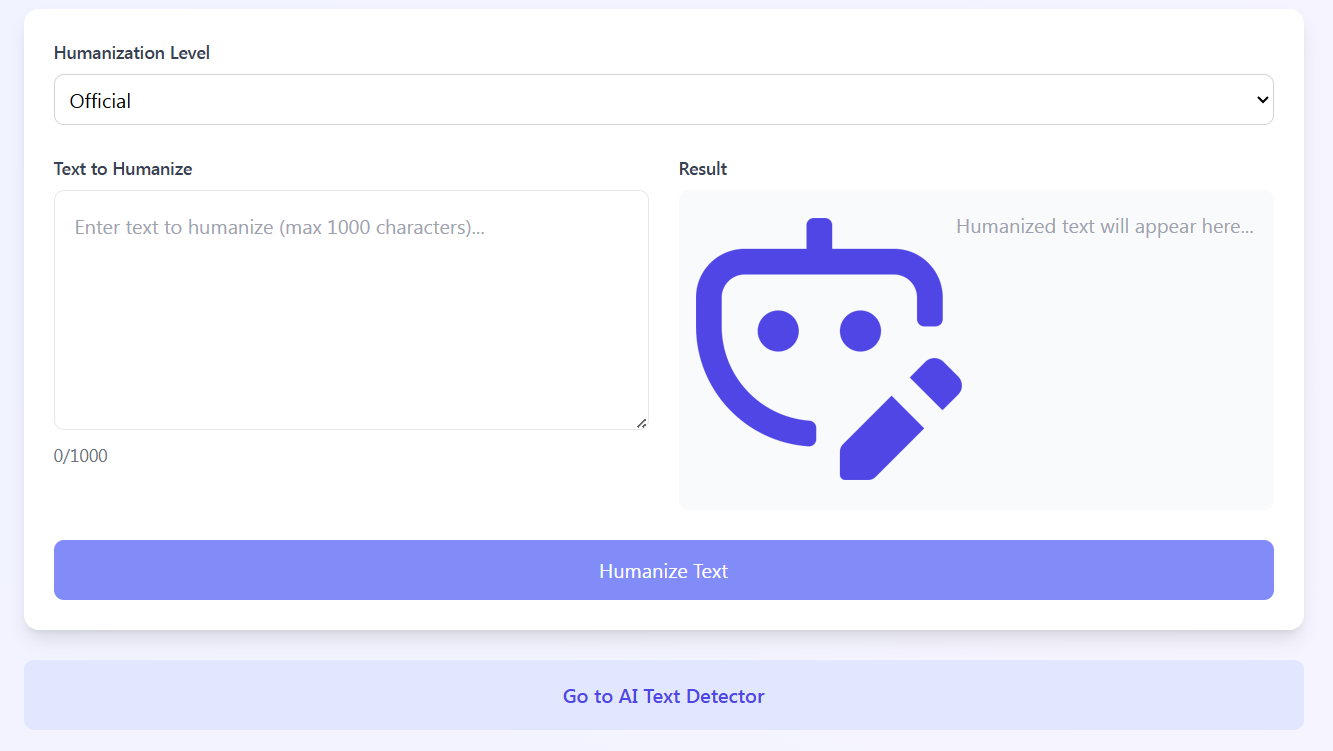
One of the easiest ways to humanize AI-generated content is by using GeneratePrompt.ai’s AI Humanizer a completely free, no-registration-needed tool built to make your AI text more readable and natural.
What Is GeneratePrompt.ai ?
It’s an online tool designed to transform robotic or repetitive AI content into fluent, human-like writing, in just one click.
Features:
• Completely free: No sign-ups, no subscriptions.
• Instant results: Paste your AI text and get a humanized version in seconds.
• Private and secure: No data storage or login required.
How to Use It:
1. Go to https://generateprompt.ai/en/ai-humanizer
2. Paste your AI-generated content into the input box.
3. Click the "Humanize" button.
4. Instantly receive a polished, human-like version of your content.
5. Copy and edit further if needed.
💡 Pro Tip: You can use this tool not only for blog posts, but also for emails, ad copy, product descriptions, and even academic writing.
__________________________________________________________________________________________________________________
Frequently Asked Questions (FAQs)
Q1: What is an AI humanizer?
An AI humanizer is a tool or method that transforms robotic AI-generated content into natural, engaging, and human-like text.
Q2: Why should I humanize AI content?
Because unedited AI content can sound generic, awkward, or repetitive, making it less effective for readers and search engines.
Q3: Is GeneratePrompt.ai’s humanizer really free?
Yes. The free AI humanizer requires no registration or payment.
Q4: Can I humanize any kind of AI content?
Absolutely. You can humanize articles, social posts, emails, academic text, and more.
Q5: Does humanizing AI content improve SEO?
Yes. Humanized content improves readability, engagement, and time on page, all of which contribute to better SEO.
Q6: How to humanize AI content?
Use tools like GeneratePrompt.ai to refine tone, add emotion, vary sentence structure, and ensure the content sounds natural and engaging.
__________________________________________________________________________________________________________________
Final Thoughts: Blend AI Power with Human Creativity
Artificial intelligence is a powerful writing assistant, but without the human touch, content often falls flat. That’s why learning to humanize AI content is essential for marketers, bloggers, businesses, and creators.
By applying the best practices we covered, and leveraging tools like the GeneratePrompt.ai AI Humanizer you can enjoy the speed of AI without sacrificing quality.
✅ Improve your content’s natural tone.
✅ Connect better with readers.
✅ Avoid SEO penalties from robotic text.
✅ Do it all for free, with no account required.
Start humanizing your content today with GeneratePrompt.ai where technology meets creativity, effortlessly.